

Neuronwriter Review (2023) – Is This SEO AI Tool Right For You?

Last Updated on June 10, 2023 by Jordan Alexo
Are you a content creator or an SEO specialist looking to improve your website’s ranking on search engines? If your answer to the above question is yes, then you might want to consider using NeuronWriter.
NeuronWriter is an AI-powered SEO tool that helps users with keyword research, content optimization, and more.
The tool’s advanced algorithms analyze search data to identify and suggest effective keywords to increase website traffic.
In this Neurowriter review, I will look at the main features, advantages, and potential drawbacks of NeuronWriter to help you determine whether this SEO tool is right for you.

Our Take
Neuronwriter is an AI-powered SEO tool that helps you create optimized content for higher ranking in search engine results.
It provides features such as keyword research, content optimization suggestions, re-phrase, expansion tool, and plagiarism checker to ensure the uniqueness of the content created. It also has an Academy to help users learn how to use the tool.
| Best For | SEO |
| Price | Starts at €19/monthly |
| Discount | – |
| Promotion | Appsumo Lifetime |
What Is Neuronwriter? (AI Writer + SEO Tool)

Neuronwriter is a combination between an A.I. writer and an SEO tool. It has a unique approach to generating optimized content that matches the intent of your target audience.
You have several other valuable features, but the main focus of Neuronwriter is creating effective copy for your website that ranks well in search engines.
For this reason, you have a content editor that allows you to create AI-generated content. You can quickly create headings and subheadings and fill each section with relevant information.
But unlike other A.I. tools, you also have an SEO tool that provides suggestions of keywords to use based on your competitors and other relevant factors.
As you write content and include relevant search terms, Neuronwriter’s SEO content score will update in real-time.
Allowing you to see how your content performs compared to other similar web pages online.
This way, you can speed up your content process and achieve better SEO results with less effort.
How Does Neuronwriter Work?
Neuronwriter works by using artificial intelligence to generate content. Also, you can choose the ChatGPT 3.5, GPT 4, and Text-Davinci-003 models to create content.

Although using GPT 4 provides the most human-like content, it spends more credits on your account.
Neuronwriter’s A.I. algorithms analyze the SERP for your targeted keywords and identify the best content in structure, tone, and keywords.
As a result, you can produce well-structured and highly optimized content that is likely to rank higher in search engines.
Appsumo Neuronwriter Deals
You can currently get access to Neuronwriter through an App Sumo lifetime deal.
Now I’m unsure if this deal will be up while you read this. But I suggest checking it out if you want to try out Neuronwriter.
Check here for the latest Appsumo deals on Neuronwriter.
What Are The Benefits Of Using Neuronwriter?
So how can Neuronwriter benefit you? Let’s see three major factors:
1 – Save Time
Whether you have a blog, business website, or e-commerce store, creating content can be time-consuming. With Neuronwriter, you can quickly generate optimized content with the help of A.I., saving you precious time that you can use to grow your business.
2 – Improve SEO Ranking
We all want to get more website traffic, and one of the best ways to do this is by improving our search engine rankings. However, SEO has become more complex recently, and many people struggle to optimize their content effectively.
Using Neuronwriter makes this process much easier, as its SEO tool provides real-time feedback on your content’s performance and suggests relevant keywords to include.
3 – Create High-Quality Content
In a way, creating high-quality content consists of two things: replying to the search query and engaging the reader.
Neuronwriter analyzes your competitors and provides you with ideas on how to improve your content, ensuring that it is both engaging and informative for your audience.
Who Is Neuronwriter Ideal For?
Any online content creator who wants to quickly produce quality content that ranks higher on Google and other search engines. This includes:
- Bloggers
- E-commerce store owners
- Small business owners
- SEO agencies and consultants
- Content marketers
So, if you’re a busy content creator who wants to save time, boost your SEO rankings, and create high-quality content, Neuronwriter could be your ideal tool.
Best Features Of Neuronwriter
Let’s check out some of the best features of Neuronwriter:
1 – Content Editor
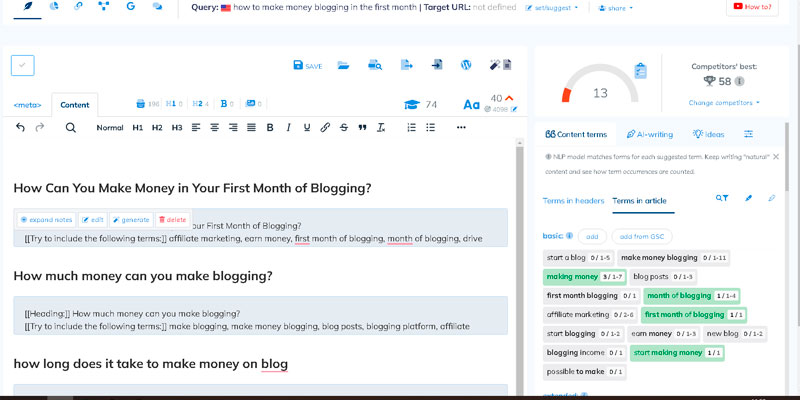
Neuronwriter content editor lets you auto-generate text for your blog posts. You can quickly create headings and subheadings and fill each section with relevant information.
At the same time, it provides real-time suggestions for search terms and optimization based on your writing.
2 – A.I. Generation Options

A – Rephrase Tool
You can use this option to rephrase text and avoid plagiarism easily.
B – Expand
If you’d like to expand your content, you can use this option to generate more paragraphs.
C – Start a paragraph
You can ask artificial intelligence to write a paragraph related to what you’ve already written.
D – Show AI-Writing Templates
Neuronwriter comes with over 20 templates. It has fewer options than other A.I. writing tools, etc. However, other tools don’t have an SEO tool like Neuronwriter, which sets it apart.
Here are some templates included with Neuronwriter:

- Article Intro: A.I. generates an enticing intro for your blog post
- FAQ: This template lets you quickly create a frequently asked questions section.
- Product Description: A great option for e-commerce websites looking to create an appealing product description.
- Article Topic Ideas: Don’t know what to write? Use this template to generate topic ideas and get inspiration for your content strategy.
- Topical Map: Neuronwriter’s Topical Map feature allows you to enter a topic and receive related keywords that can help optimize your content for SEO purposes.
You have other useful templates, such as a content plan, YouTube description, email, and more.
3 – On-Page SEO Guidelines

You have several suggested search terms on the side. You want to include these keywords throughout your content naturally and organically.
Although search engines use robots to understand your website, it’s still humans who read your content.
As you do this, you’ll notice your SEO content score increasing.
Also, as you add these terms throughout your post, you’ll notice a percentage and a green checkmark indicating that the keyword has been used enough times.
You want to have at least an average content score for that keyword. But for best results, aim to overcome the top-performing page.
4 – Grammar and Plagiarism Checker

Neuronwriter comes with an integrated grammar and plagiarism checker, which is incredibly helpful for writers who want to ensure their content is top-notch.
5 – Content Plan Ideas + Management


This feature is ideal for content creators looking to organize and plan their content strategy. You can use the “content plan ideas” option to schedule your blog posts. Also, you can designate the person or team responsible for creating and publishing each post.
In the management section, you have a calendar where you can see all the articles scheduled for publication.
Personal Experience: How To Use Neuronwriter?
Neuronwriter helps you speed up content creation, and I will show you how!
Step 1 – Create a New Project

I entered my account and created a new project for my site “Jordanalexo.com.” You should have separate projects for each website you manage.
Step 2 – New Query

You want to add your main keyword in the “New Query” section and select your target location and language. This keyword will be the focus of your content creation and search engine optimization.
Afterward, it will analyze the search engine results pages and provide the following:

- Content Score: This score indicates how well your competitors’ content is optimized for the target keyword.
- Length (Words): The word count of the top-ranking pages for the target keyword.
- Google Rank: Well, the rank of that page on Google SERP
- Page Title: The title of the top-ranking pages for the target keyword.
- URL: The URL of the top-ranking pages for the target keyword.
You should select the pages with the highest content score. This lets